InTown
- 4.6
- Rating
- 10.00K
- Installs
- Free
- Price

 Analysis by App-foxy
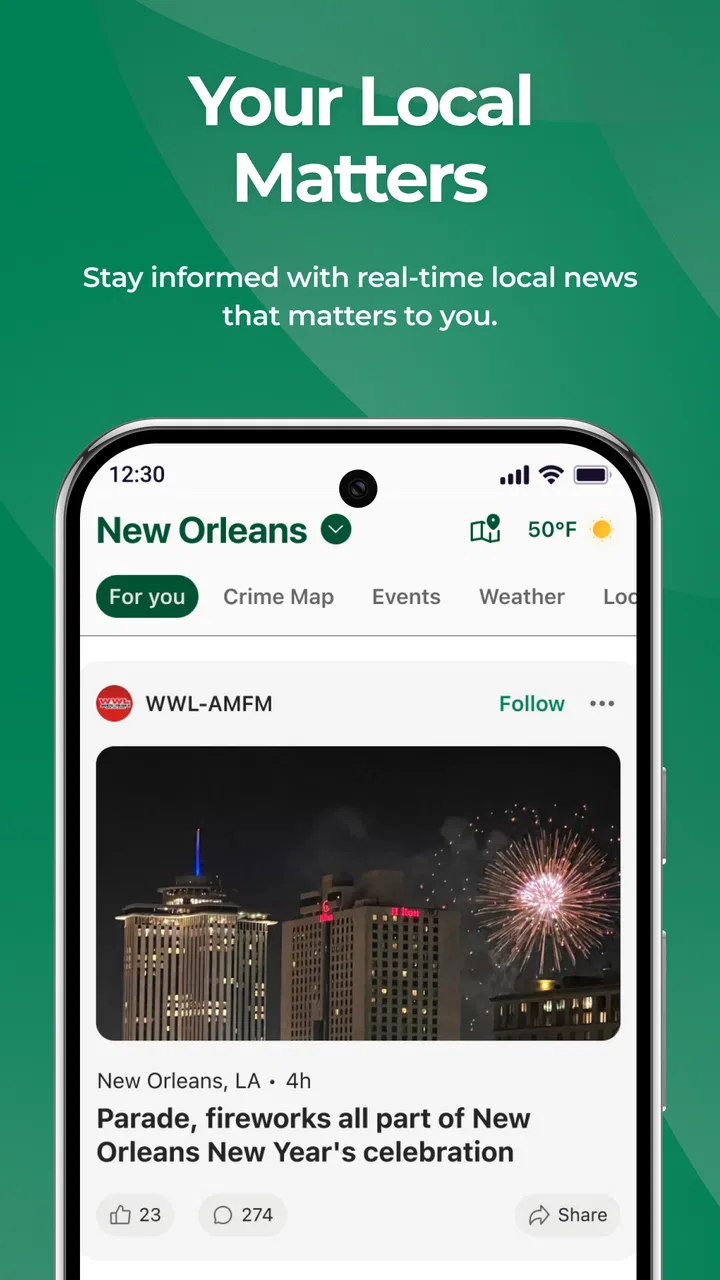
When I want a quick sense of what is happening close to home, I usually prefer a focused local app over a national news feed filled with stories I will never use. InTown takes that narrower approach. It brings together local news, crime alerts, local television information, and events in one place, which makes it more practical for everyday awareness than a broad headline reader. I reviewed it as a free news and magazines app from LifeAgents, and my overall impression is that its value depends less on long reading sessions and more on how well it fits into a daily local-information routine.
The app is currently listed as InTown, and its simple identity is part of the appeal. It is not trying to be a complete replacement for every newspaper, broadcaster, calendar, or emergency source. Instead, it aims to reduce the effort involved in checking several kinds of nearby information. For someone who wants local context before leaving home, planning an evening, or understanding what is happening around the neighborhood, that concentration can be useful.
How InTown fits into a local news routine
My first useful takeaway is that InTown works best as a checking tool rather than an app I would open for an extended reading session. The combination of local stories, crime-related notices, television content, and events encourages short visits throughout the day. I can imagine opening it in the morning for a quick scan, checking it again before going out, and returning when I need a local event or update.
You May Also Like

 AccuWeather: Weather Radar
AccuWeather Review: A Quick, Clear Forecast for Everyday Decisions
For everyday plans, the best forecast is the one you can understand quickly. AccuWeather makes rain timing, radar, and local conditions easy to act on, with a few trade-offs.

 Hill Climb Racing
Why Hill Climb Racing Still Turns Crashes Into One More Run
A tiny car, a bumpy hill and one more upgrade: Hill Climb Racing keeps resurfacing because its simple chaos makes every near-miss feel personal.

 AliExpress - Shopping App
AliExpress Makes Global Shopping Feel Personal, but Shoppers Bear the Risk
AliExpress turns a global marketplace into a pocket-sized discovery engine. Its reach is useful, its shopping loop compelling, and its trade-offs easy to miss.

 Lords Mobile: Kingdom Wars
Lords Mobile Is a Kingdom-Building Routine, Not a Quick Match
A case-by-case verdict on the building, battles, device demands, and social commitments that make Lords Mobile rewarding for some players and exhausting for others.

 PDF Scanner app - TapScanner
TapScanner Makes Paperwork Easier to Capture, Check, and Share
TapScanner makes scanning with a phone feel less like a rescue operation and more like a dependable step in getting work done. Its capture tools are useful, though not flawless.

 Block Blast!
 Shows How Much a Puzzle Game Can Leave Out
A quiet grid game shows why puzzle players increasingly value instant clarity, repeatable skill and low-pressure play—and where the genre still needs to catch up.
More From Our News Desk
View All News


That rhythm matters because local information has a different purpose from national news. A national app is often built around importance, popularity, or breaking coverage. InTown is more relevant when the question is practical: is something happening nearby, should I be aware of a local incident, what is on local television, or is there an event worth attending? The app’s focus gives those questions more prominence than they usually receive in a general news reader.
A realistic everyday example would be a weekday evening when I am deciding whether to meet friends in town. I could use the news section to see whether a local situation might affect the area, look through events for something happening nearby, and check local television without switching between several apps. That does not eliminate the need to verify important information through official sources, but it makes the first search faster and less scattered.
The app is also approachable for people who do not want a complicated news interface. Its content rating is Everyone, and the minimum operating system is Android 8.0, so it is aimed at a broad range of users rather than only owners of newer phones. I would still judge the experience on the individual device, especially if the phone is older, but the supported Android baseline makes the app accessible to many everyday users.
What the current version suggests about the product
The current version is 25.52.16, while the app’s listed release date is January 6, 2026. Those details place InTown in a relatively recent stage of its public life, so I see it as a product that is still establishing its identity rather than a mature platform with years of accumulated expectations. That is important when deciding whether to rely on it as a primary source or use it alongside familiar local outlets.
At this stage, I would approach the app with a practical mindset. The central idea is clear, but a local-information product becomes genuinely indispensable only when its coverage, update speed, and relevance consistently match the user’s area. Those qualities can vary by location, and they are more important here than visual polish or the number of sections on the screen.
The public response is encouraging without being overwhelming: InTown has an average rating of 4.6 from 113 ratings and has passed 10K installs. I read that as a sign that the concept is connecting with an initial audience, not as proof that every location will receive the same level of usefulness. A local app can be excellent for one community and less valuable in another if the available information differs.
What I would check during the first setup
My advice is to spend a few minutes learning how the app organizes local information before deciding whether it deserves a permanent place on the home screen. I would first identify where local news ends and alerts begin, then check how events and television content are separated. This small orientation step prevents a common problem with mixed-content apps: opening them for one purpose and missing the section that actually matters.
I would also establish a simple personal routine instead of turning on every possible notification immediately. If the app presents alert options, I would begin with the categories most relevant to my daily life and adjust after using it for a while. That approach reduces notification fatigue, which can make users ignore genuinely useful local notices later.
Another practical tip is to treat event information as a planning aid, not a final confirmation. Before traveling to an event, I would still check the organizer’s latest details, particularly for changes in time or location. InTown can help me discover something nearby, but discovery and confirmation are two different steps.
What the app does well and where judgment is needed
I look at this section through a household lens: the app can give people sharing a home a common place to notice nearby developments, but it should not be mistaken for a shared family dashboard or a source of urgent instructions. I’d agree on which updates deserve a follow-up and who will verify them, so a headline becomes a useful prompt rather than an assumption. That makes the next question less about convenience and more about how each person uses the app.
A useful bridge between several local sources
The strongest idea behind InTown is the bridge it creates between different kinds of local information. News, crime alerts, television, and events are usually handled by separate services, each with its own interface and update habits. Bringing them together can save time and, more importantly, help me connect information that I might otherwise view in isolation.
For example, a local event may be more or less attractive depending on what else is happening in the area. A local television listing can be useful when I want something immediate at home, while an event section supports a decision to go out. Crime alerts serve a different purpose altogether, but placing them within the same local context may help me pay attention to my surroundings without constantly searching several sources.
This does not mean the app should replace official emergency channels. I would not use a general local app as my only source for urgent safety decisions. Its role is better understood as an awareness layer: something that helps me notice relevant local developments and decide when more authoritative checking is needed.
The trade-off between convenience and depth
InTown’s focused format is convenient, but focus can also mean less depth than a dedicated newspaper or broadcaster. If I want a long investigation, extensive background, specialist reporting, or a complete archive, I would probably choose a traditional local publication or the official app of a trusted news organization. The advantage here is the combined local overview, not necessarily the most detailed treatment of every story.
The same trade-off applies to television information. A local TV section is handy when I want a quick view of nearby programming, but viewers who already have a preferred television guide may not gain much from changing habits. The feature becomes more valuable for people who want local content gathered alongside news and events, rather than for someone who only needs a highly detailed program schedule.
Events present a similar question. InTown may be a good starting point for finding ideas, especially when I want to see what is happening locally without browsing multiple calendars. However, users who organize events professionally or need advanced filtering, ticket management, reminders, or venue-specific tools may still prefer a dedicated events service. The app’s strength is convenience across categories, not specialization in one of them.
Who is most likely to benefit
I would recommend trying InTown if you live in an area covered by its local information and want one lightweight place to check several types of updates. It is particularly suitable for people who follow neighborhood developments, enjoy finding nearby activities, or want local television information without maintaining a collection of separate apps.
It may also suit someone who has recently moved and is trying to build a sense of connection with a new area. National news can tell me what matters broadly, but local news and events help me understand the immediate community. InTown can support that discovery process by putting practical local topics closer together.
Families may find the combined approach useful when planning around school-day routines, weekend activities, or changes in the surrounding area. I would still verify any important safety information independently, but having local notices visible during an ordinary news check can be valuable.
On the other hand, I would skip it if my main need is international reporting, deep political analysis, financial news, or a highly specialized news feed. I would also hesitate if the local coverage in my area feels thin or if I already have a trusted set of official sources that covers the same needs more reliably. Installing another app only makes sense when it reduces effort or adds useful context.
How it compares with the usual alternatives
Compared with a national news app, InTown feels more immediately relevant for nearby decisions but less suitable for building a broad view of the world. A national service usually offers stronger breadth and more developed topic navigation. InTown’s advantage is that local news, alerts, television, and events are closer to the center of attention.
Compared with a dedicated local newspaper app, it may be more convenient for scanning several local categories, while the newspaper may offer deeper reporting, editorial continuity, and a stronger single-source identity. I would use InTown for orientation and discovery, then open a trusted publication when a story deserves a closer read.
Compared with a standalone events calendar, InTown has the benefit of placing events beside local news and alerts. The compromise is that it may not satisfy users who need sophisticated planning tools. Compared with a television guide, it can be more useful for people who want broader local context, but less compelling for someone whose only goal is to find a channel and program quickly.
This makes the app complementary rather than universally superior. Its best position is the first stop in a local-information workflow. It helps me decide what deserves attention; specialized sources remain better for confirmation, depth, and detailed action.
Small habits that make the app more useful
I would use InTown at predictable moments instead of constantly refreshing it. A morning scan can provide context for the day, while an evening check can help with events and local television. This schedule keeps the app useful without allowing local updates to become a constant distraction.
I would also compare an important alert with an official source before changing plans. This is not a criticism unique to InTown; it is a sensible habit for any app that aggregates or presents fast-moving local information. The more serious the consequence, the more important it is to confirm the original authority.
A third useful workflow is to separate discovery from follow-through. I might find an event in the app, note the location and timing, and then confirm the details before leaving. I might notice a local story there, then read the fuller report through the responsible news outlet. Thinking of InTown as the first layer makes its convenience clearer and avoids expecting one app to perform every task perfectly.
What existing users should expect as the product develops
Because the app is still relatively new and has a modest but positive user base, existing users should pay attention to how consistently it improves the everyday experience. The most meaningful progress would be practical: clearer separation between content types, dependable local relevance, timely updates, and an easy way to return to the information a user actually needs.
I would not judge future changes only by the appearance of new sections. For this kind of app, a small improvement in relevance or alert handling can matter more than a larger visual redesign. Users should watch whether the app becomes easier to personalize and whether the local content feels more useful over repeated visits.
At the same time, expectations should remain grounded. The current version is evidence that LifeAgents is maintaining an active product, but a version number alone does not tell me how every local feed behaves. I would evaluate updates by their effect on my own routine: fewer unnecessary checks, clearer information, and better confidence about where to verify important details.
Questions I would ask before keeping it installed
The first question is whether InTown covers my area in a meaningful way. Since the app is built around local information, location relevance is the deciding factor. I would use it for several ordinary days and see whether the news and events feel connected to my community rather than merely local in name.
The second question is whether it saves me time. If I still need to open several other apps for every useful detail, its role may be limited. That is not automatically a failure, because discovery alone can be valuable, but I would want the combined view to reduce at least some of my routine searching.
The third question is whether the alerts fit my tolerance for interruptions. I would rather receive a small number of meaningful notices than a noisy stream that encourages me to disable everything. A calm notification experience is especially important for an app that includes crime-related information.
The fourth question is whether I need depth or breadth. If I want a local snapshot across several topics, InTown makes sense. If I want detailed journalism, a complete television database, or advanced event planning, I would choose a specialist alternative and perhaps keep this app only as a supplementary tool.
Finally, I would ask whether the free price changes the decision. Since InTown costs nothing, the barrier to trying it is low, and that makes a short real-world test worthwhile. The more important investment is attention: the app earns a lasting place only if its local information is relevant enough to become part of my routine.
My final view after using the local-first approach
InTown is a sensible choice for readers who want nearby information gathered into one accessible news and magazines app. Its combination of local news, crime alerts, local television, and events gives it a clear everyday purpose, and the free model makes experimentation easy. I especially like the idea of using it as a starting point for deciding what deserves a closer look.
I would not present it as a complete replacement for official alerts, established local journalism, specialist television guides, or dedicated event services. Its usefulness depends on the quality and relevance of the local information available to each user. That is the central trade-off: convenience and local breadth in exchange for the possibility that a specialized source will provide greater depth or certainty.
With an average rating of 4.6 and more than 10K installs, it has made a promising start, while its Everyone rating and Android 8.0 support keep it approachable. My recommendation is straightforward: try InTown if you want a compact local overview, use it at planned moments during the day, and confirm important details through the original source. For that specific purpose, InTown feels more useful than a generic headline feed and more flexible than relying on a single local outlet.
FAQs for InTown
01What is InTown and what can I use it for?
InTown is designed to help users discover and interact with places, activities, services, or people in their local area, depending on the features available in the version you install. After opening the app, you can generally browse nearby options, view useful details, and decide what matches your interests. Its usefulness depends on how much information is available in your city or region.
02Is InTown free to download and use?
InTown may be available as a free download, but some features, services, bookings, promotions, or premium content could require payment. Before using it extensively, check the app’s store listing and in-app pricing information. You should also review whether optional subscriptions renew automatically, since free installation does not always mean that every function is available without additional charges.
03Does InTown require location access?
Location access is likely important if you want InTown to show nearby places, recommendations, events, or services accurately. You may be able to deny permission and browse manually, but some location-based functions could be limited. When installing the app, review the permission request carefully and choose the option that suits you, such as allowing access only while using the application.
04Do I need to create an account to use InTown?
Some parts of InTown may be accessible without registration, particularly basic browsing or general information. However, an account may be required for personalized recommendations, saving favorites, contacting businesses or users, making reservations, posting content, or receiving notifications. If you register, use an email address you regularly access and review the privacy settings before sharing additional personal information.
05Is InTown safe and available in every location?
InTown’s availability and usefulness can vary considerably by country, city, and local provider participation. Before downloading, confirm that the app supports your area and check recent user reviews for comments about reliability, customer support, and data handling. As with any location-based service, avoid sharing unnecessary personal details and review the privacy policy and requested permissions.
Pros
- Quickly discover nearby events
- venues
- and local activities in one place.
- Location-based suggestions make exploring unfamiliar areas more convenient.
- Useful for finding entertainment options without extensive online searching.
- Can help users support local businesses and community events.
- Simple browsing experience makes spontaneous plans easier to arrange.
Cons
- Recommendations may vary greatly depending on your city and local listings.
- Some events or venues may have incomplete
- outdated
- or missing details.
- Location access can affect battery life and raises privacy considerations.
- The app may be less useful in areas with limited community activity.
- Availability
- pricing
- and booking options may depend on third-party providers.

InTown
Gallery